
Canva vs Photoshop
In today’s digital world, creative skills are among the most valuable career assets. Whether you want to become a freelancer, graphic designer, social media manager, content creator, or digital marketer, learning a design tool can open up numerous earning opportunities. One of the most common questions beginners ask is: Canva vs Photoshop: Which Skill Pays More?
The debate around Canva vs Photoshop: Which Skill Pays More? has become increasingly relevant as businesses, startups, influencers, and brands continue to invest in visual content. Both tools are powerful in their own ways, but they serve different purposes and offer different career opportunities.
In this detailed guide, we will explore Canva vs Photoshop: Which Skill Pays More?, compare earning potential, career opportunities, freelance demand, learning curve, and future scope to help you decide which skill is best for your career goals.
Understanding Canva
Canva is a user-friendly graphic design platform that allows users to create social media posts, presentations, flyers, posters, resumes, infographics, and marketing materials without advanced design knowledge.
Canva has gained massive popularity because of its drag-and-drop interface, ready-made templates, and ease of use. Small businesses, entrepreneurs, students, and marketers widely use Canva for everyday design tasks.
Key Features of Canva
- Easy drag-and-drop editor
- Thousands of templates
- Social media content creation
- Presentation design
- Video editing capabilities
- Brand kit management
- Team collaboration features
Because Canva is beginner-friendly, many freelancers and digital marketers start their design journey with Canva.
Understanding Photoshop
Adobe Photoshop is one of the most powerful graphic design and image editing software programs in the world. It is considered the industry standard for professional design, photo editing, and digital art.
Photoshop offers advanced features that allow professionals to create high-quality designs, manipulate images, create advertisements, and work on branding projects.
Key Features of Photoshop
- Professional photo editing
- Advanced image manipulation
- Layer-based editing
- Digital painting
- Graphic design creation
- Advanced retouching
- Professional branding design
Photoshop requires more time and effort to learn, but it provides access to higher-level design opportunities.
Canva vs Photoshop: Which Skill Pays More?
To answer Canva vs Photoshop: Which Skill Pays More?, we need to analyze several factors:
- Freelancing income
- Job opportunities
- Corporate salaries
- Client demand
- Skill difficulty
- Long-term growth
Let’s examine each factor in detail.
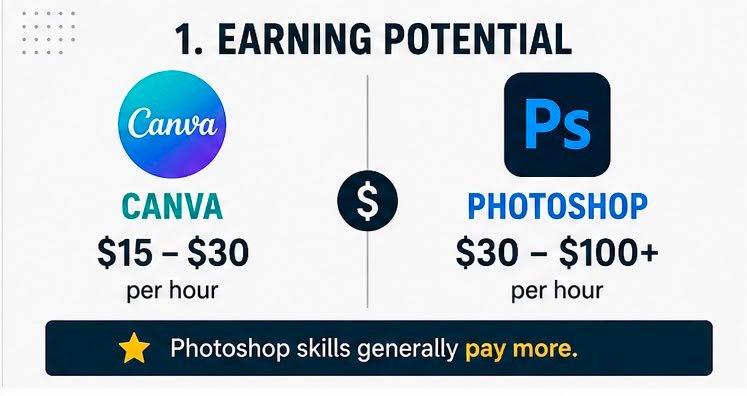
Freelancing Income Comparison
Freelancing is one of the biggest income sources for designers today.
Canva Freelancer Earnings
Canva freelancers typically work on:
- Instagram posts
- Facebook ads
- Social media graphics
- Presentation designs
- Flyers and brochures
- Marketing creatives
Average Canva Freelancing Income
- Beginner: ₹10,000 – ₹25,000/month
- Intermediate: ₹25,000 – ₹50,000/month
- Experienced: ₹50,000 – ₹1,00,000+/month
Many Canva freelancers earn by providing social media management and content creation services.
Photoshop Freelancer Earnings
Photoshop professionals usually work on:
- Professional graphic design
- Logo creation
- Brand identity design
- Product image editing
- Advertising creatives
- Digital illustrations
- High-end photo retouching
Average Photoshop Freelancing Income
- Beginner: ₹20,000 – ₹40,000/month
- Intermediate: ₹50,000 – ₹1,50,000/month
- Experienced: ₹2,00,000+/month
When discussing Canva vs Photoshop: Which Skill Pays More?, Photoshop generally offers higher earning potential because clients pay more for specialized design skills.
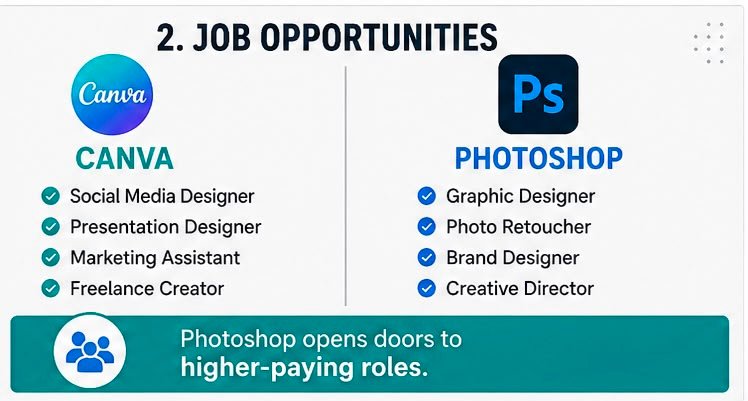
Job Opportunities Comparison
Canva Job Opportunities
Canva skills are useful for:
- Social Media Executive
- Digital Marketing Executive
- Content Creator
- Marketing Coordinator
- Virtual Assistant
- Social Media Manager
Most Canva-related roles combine design with marketing responsibilities.
Average Salary
- Fresher: ₹2.5 LPA – ₹4 LPA
- Experienced: ₹4 LPA – ₹7 LPA
Photoshop Job Opportunities
Photoshop professionals can work as:
- Graphic Designer
- Visual Designer
- UI Designer
- Brand Designer
- Photo Editor
- Creative Designer
- Advertising Designer
Average Salary
- Fresher: ₹3.5 LPA – ₹6 LPA
- Experienced: ₹8 LPA – ₹15 LPA+
- Senior Professionals: ₹20 LPA+
From a salary perspective, Photoshop usually wins in the debate of Canva vs Photoshop: Which Skill Pays More?
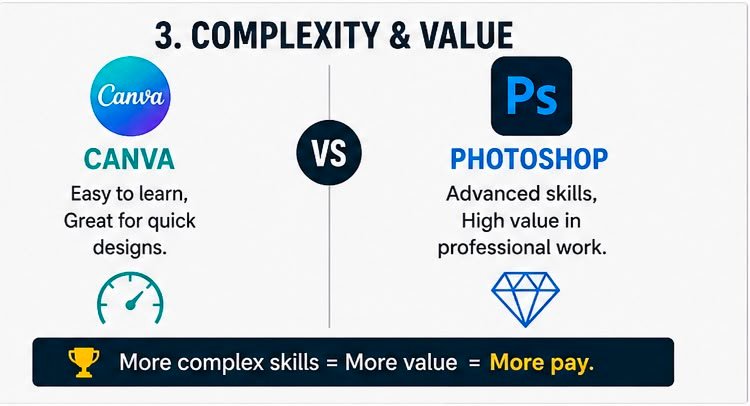
Learning Curve Comparison
Canva Learning Curve
One major advantage of Canva is its simplicity.
You can learn:
- Basic designing
- Social media graphics
- Templates customization
- Marketing creatives
Within a few weeks, beginners can start creating professional-looking designs.
Photoshop Learning Curve
Photoshop requires learning:
- Layers
- Masks
- Selection tools
- Typography
- Retouching
- Color correction
- Advanced design principles
It may take several months to become proficient.
Winner
- Easier to Learn: Canva
- More Advanced: Photoshop
Demand in the Freelance Market
Canva Demand
Small businesses often hire Canva designers because:
- It is affordable
- Fast content creation
- Social media-focused designs
- Quick turnaround time
The rise of personal brands and influencers has significantly increased Canva demand.
Photoshop Demand
Photoshop remains essential for:
- Agencies
- Advertising companies
- Professional photographers
- E-commerce brands
- Corporate marketing teams
These clients generally pay higher fees due to the complexity of work.
When considering Canva vs Photoshop: Which Skill Pays More?, Photoshop clients usually have larger budgets.
Skill Value in Digital Marketing
Digital marketers frequently use Canva for:
- Social media content
- Ad creatives
- Presentations
- Marketing graphics
Photoshop is often used for:
- Advanced advertisements
- Landing page graphics
- Professional branding
- Product editing
For digital marketing professionals, Canva may provide faster employment opportunities, while Photoshop can help secure higher-paying creative roles.
Canva vs Photoshop for Students
Students often wonder which skill they should learn first.
Why Students Choose Canva
- Free version available
- Easy learning process
- Quick project completion
- Useful for internships
- Suitable for social media management
Why Students Choose Photoshop
- Professional industry skill
- Higher salary potential
- Better creative opportunities
- Strong portfolio development
- Long-term career growth
For beginners, Canva is an excellent starting point, while Photoshop is ideal for those seeking professional design careers.
Future Scope of Canva
The future of Canva looks promising because:
- Businesses need constant content creation
- Social media marketing is growing rapidly
- Remote work opportunities are increasing
- AI-powered design tools are expanding
Canva designers can earn well through content creation and digital marketing services.
Future Scope of Photoshop
Photoshop continues to dominate professional design industries because:
- Advanced editing capabilities
- Professional branding requirements
- Advertising industry demand
- Creative agency dependence
- High-end design projects
Photoshop remains one of the most valuable creative skills globally.
Canva vs Photoshop: Which Skill Pays More for Freelancers?
If your goal is quick freelancing income:
Canva Advantages
- Faster learning
- Easier client acquisition
- Quick project delivery
- Suitable for beginners
Photoshop Advantages
- Higher project rates
- Better premium clients
- More specialized services
- Greater earning ceiling
In terms of pure income potential, Photoshop generally pays more.
Canva vs Photoshop: Which Skill Pays More for Jobs?
For job seekers:
Canva-Based Careers
- Digital Marketing Executive
- Content Creator
- Social Media Manager
- Marketing Assistant
Photoshop-Based Careers
- Graphic Designer
- Brand Designer
- Creative Designer
- Visual Designer
Photoshop professionals often receive higher salary packages due to advanced expertise requirements.
Can You Learn Both?
Absolutely.
In fact, the most successful professionals often combine Canva and Photoshop skills.
Benefits of Learning Both
- More job opportunities
- Higher freelancing income
- Better client retention
- Wider service offerings
- Stronger portfolio
Many agencies prefer candidates who can efficiently use Canva for quick content creation and Photoshop for advanced design projects.
Best Career Strategy in 2026
A practical roadmap is:
Step 1
Learn Canva basics in 2–4 weeks.
Step 2
Start creating social media content and build a portfolio.
Step 3
Learn Photoshop fundamentals.
Step 4
Master photo editing, branding, and advanced design.
Step 5
Offer both Canva and Photoshop services as a freelancer or agency professional.
This approach provides both immediate earning opportunities and long-term career growth.
Final Verdict: Canva vs Photoshop: Which Skill Pays More?
After comparing every aspect of Canva vs Photoshop: Which Skill Pays More?, the answer depends on your goals.
If you want to start earning quickly with minimal learning time, Canva is an excellent choice. It is beginner-friendly, highly demanded in social media marketing, and offers plenty of freelance opportunities.
However, if your primary objective is maximizing income, securing higher-paying clients, and building a long-term design career, Photoshop generally pays more. Professional designers with strong Photoshop skills can command significantly higher project fees and salaries.
Conclusion
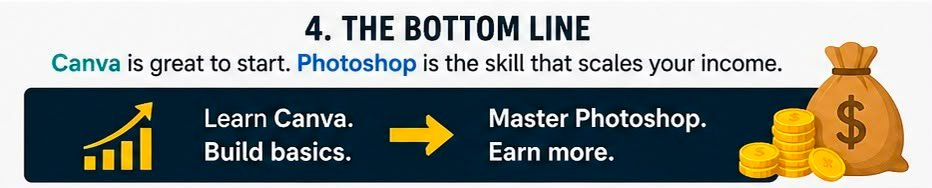
When it comes to Canva vs Photoshop: Which Skill Pays More?, Canva offers faster entry into the market, while Photoshop offers greater long-term earning potential. The smartest approach is not choosing one over the other but learning both. Canva helps you start quickly, and Photoshop helps you scale your career and income over time.
By mastering both tools, you can position yourself as a versatile creative professional and unlock the highest-paying opportunities in digital marketing, graphic design, branding, freelancing, and content creation.